Showing posts with label schema compare. Show all posts

Sunday, January 31, 2021

Synchronize database schemas - SQL Compare SDK

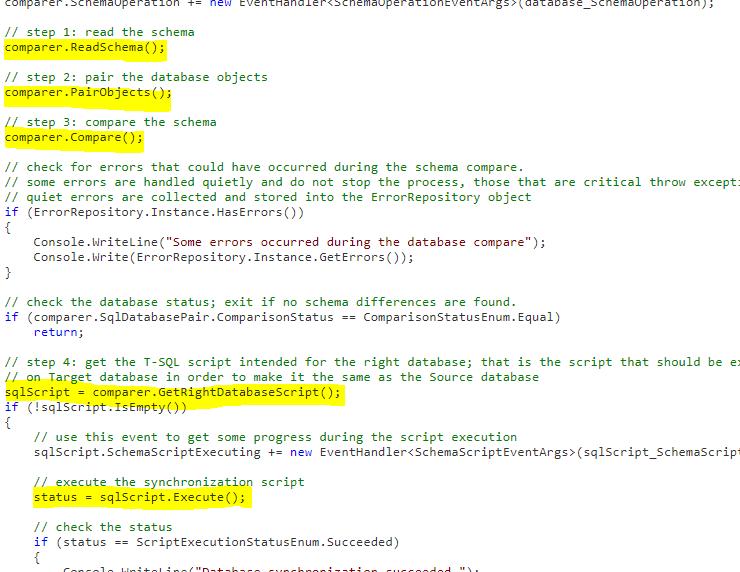
Comparing and synchronizing the schemas of two SQL Server databases is very easy with xSQL Software's SQL Schema Compare SDK. As you can see in the code snippet in the image below, there are only 5 simple steps involved in making the schema of database A the same as the schema of database B: 

  1. Read the schemas of both databases
  2. Pair objects based on the object name
  3. Compare the paired objects to each other
  4. Generate the synchronization script
  5. Execute the script on the target
Of course, as we have mentioned in other articles, SQL Compare SDK gives you complete control over the database compare operation allowing you to:
  1. exclude or include certain types of objects - for example, if you do not want to compare database users you can do comparer.Options.CompareUsers = false
  2. create entity filters to exclude for example only stored procedures the name of which starts with sp_PS
  3. exclude / include specific objects, for example don't compare table "employees"
  4. set comparison options and scripting options based on your specific requirements 
  5. set execution options such as transaction size, whether to continue execution on error etc. 

Download the SQL Schema Compare SDK and check out the extensive documentation - you will be able to build your first database comparison and synchronization application in no time. 

Friday, December 16, 2016

Synchronization tools for SQL Server Express

Most of the tutorials/case studies I have presented in this blog have had SQL Server Enterprise edition as their primary focus. However, the reality is that, this version, if you didn't get the hint from its name, is mostly for big enterprises that need advanced features like SQL Server Agent or Analysis Services. In any other case this version is a bit of an overkill. In these cases, SQL Server Express is a very good starting point because it's free and offers a lot to work with, such as a full database engine, full T-SQL support, full text search, native XML, and some very useful built in tools like SQL Server Management Studio. A few classic examples where SQL Server Express is a very good option are:

  • Deploying desktop windows solutions that use SQL Server to users who do not own a SQL Server. Given that it's free, its setup can be embedded in the application's setup so that Windows application can enjoy most of SQL Server's functionality.
  • Lightweight web applications that only need to use small SQL Server databases such as websites using a CMS like Umbraco.
  • Testing and developing applications with a local database.
Although it has some limitations regarding the processing power it can use, computer memory available and database size, it is suitable for a wide range of applications. Now, this might be something that one does not think of right away, but at some point in time, it's certain that there will be the need to perform some kind of database synchronization. This is where SQL Server Express has another advantage. Some of the synchronization tools, xSQL Schema Compare and xSQL Data Compare included, follow the same 'no charge' pattern set by Microsoft for this version of SQL Server. The Lite version of these two tools, when used with SQL Server Express offers the full functionality of the licensed version. Let's first have a look at the windows desktop solution case which, in my opinion is a very interesting case where schema synchronization is useful.

Suppose you have created and deployed a desktop Windows application that uses a SQL Server database. A good example here might be an app that does some sort of system monitoring and stores any data it finds in the database. SQL Server Express is a clear choice for the database because there is no complex functionality required and the database size is very likely to be small. Let's also suppose that you have just developed a major update for the app that includes a lot of database changes. How would you go about transferring those changes in the clients' databases? One option would be to generate the full schema script from SSMS and during the update's installation on the client, run that script to recreate the database. As you can imagine this is not an optimal choice because it would delete all the data that are already saved in the database. Another option is to manually generate the script but, in most cases, simply mentioning this, would get you a few "are you kidding?" looks as it is a very tedious and error prone process. Buying a comparison tool seems like a big waste of money if you're going to use it just for this one thing, so here is where the Lite version of xSQL Schema Compare comes to the rescue. For absolutely no cost you get a tool that, on SQL Server Express, will compare the 2 database versions and generate a synchronization script that can be run during the installation process and perform all the necessary changes in the client database.

A scenario in which data comparison on SQL Server Express might be necessary is the development of websites with a CMS. Content Management Systems store all the content management-related data in a database. Take Umbraco for example. It uses an element called Document Type to provide the structure of different webpages. This element stores all the info it needs in a database which can very well be a SQL Server Express database as this type provides the necessary functionality and more. It's always a good idea to develop these sites locally or in a development server and once the changes are fully tested, upload those on the live server. Of course along side this upload, the data on the database need to be transferred as well so that the site admin won't have to recreate the new content structures. Backing up and restoring the database is not a good idea because there are some data (like the actual content of the site) that do not need to be transferred, and if the live site is on a Cloud service like Azure, restoring is not possible. Again, the best option here would be a synchronization tool and a very good choice is xSQL Data Compare. Since the synchronization will be performed on SQL Server Express, the FREE Lite version of xSQL Data Compare can be used to transfer the data. Also, the synchronization process is highly customizable (refer to the online help), so you can manually determine which tables and what data in those tables you want to synchronize. This way, only the data regarding the content structure will be transferred.
In conclusion, I think it's safe to say that the two scenarios mentioned here are a very small portion of the huge number of cases where the application of SQL Server Express is enough to fulfill a software's database needs. Keeping in mind that database synchronization is a process that sooner or later will take place in most of these cases, the extension of the 0 cost principle of SQL Server Express to its synchronization tools like in the case of the Lite versions of xSQL Data Compare and Schema Compare is something that can greatly reduce the development and maintenance costs of software.

   

Wednesday, April 6, 2016

How to move your SQL Server database to SQL Azure – easy as 1, 2, 3

Are you preparing to move your SQL Server databases to SQL Azure? In the words of one of our customers that just completed his transition "using xSQL's compare tools the process was as easy as 1,2,3": 
  1. Download and install the xSQL Comparison Bundle (1 minute)
  2. Run xSQL Schema Compare – add your SQL Server / Database to the workspace; Add your SQL Azure / Database to the workspace; Compare, Generate Sync Script, Execute (4-8 minutes*)
  3. Run xSQL Data Compare – add both servers/databases to the workspace; Compare, Generate Sync Script, Execute (5-20 minutes*)

All done, now your database is on SQL Azure. 

* time estimates for steps 2 and 3 depend on the database size and are ranges from this one customer's experience with about 12 databases that they transferred. 

Monday, October 26, 2015

xSQL Compare Tools with Azure support released

We just released version 7 of our SQL Server Schema and Data Compare tools with full support for SQL Azure v11 and SQL Azure v12. You can now compare and synchronize SQL Azure databases with on premise or on the cloud SQL Server databases. Platform differences are handled automatically and are transparent to the end user. Details of the new release are listed here http://www.xsql.com/products/sql_server_comparison_bundle/release_notes/v7/

Download the new version now: http://www.xsql.com/download/sql_server_comparison_bundle/

Wednesday, January 21, 2015

Monday, June 23, 2014

xSQL Schema Compare - Entity Filters

In cases when the two SQL Server databases being compared have a large number of objects and you know that a good percentage of those objects are the same on both of those databases it may be beneficial to only compare a subset of the objects.

xSQL Schema Compare provides a very flexible and powerful facility called entity filters that allow you to specify which objects you wish to compare and synchronize based on the object type and the name of the object. An example of an entity filter is shown in the screen shot below:
Entity filters can be accessed from the context menu of the comparison results grid. Once a schema filter is set, it's definition is stored in the comparison session so if you run the same compare again you do not need to redefine the filters.

Thursday, April 3, 2014

Schema Compare new build - schema filters are back

A new build of xSQL Schema Compare for SQL Server is available for download now. Here is what the new build brings:
  • Adds the new entity filters for schema compare UI and schema compare command line. The entity filters can be accessed from the context menu of the comparison results grid. Filter definitions are stored as part of the comparison session so you only need to set them once.  
  • Fixes an issue with extended properties associated with view columns.
  • Fixes an issue with cyclical dependencies
  • Minor user-interface improvements
xSQL Schema Compare supports all editions of SQL Server from SQL Server 2005 to SQL Server 2014 and it is completely free (no strings attached) for SQL Server Express.
 
You can download the new build from our site: http://www.xsql.com/download/sql_server_comparison_bundle/
 

Monday, March 10, 2014

xSQL Compare Bundle V5 with support for SQL Server 2014 released

We just released version 5 of our SQL Server comparison and synchronization tools, xSQL Schema Compare and xSQL Data Compare, with full support for SQL Server 2014. The release notes provide a more detailed description of what's new in this version. Here is a summary:
  • SQL Server 2014 support: full support for SQL Server 2014 including all new and improved SQL Server 2014 objects such as memory-optimized filegroups, memory-optimized tables, hash and range indexes, columnstore indexes, memory-optimized table types, natively-compiled stored procedures, primary and secondary selective xml indexes, Xml index and namespace paths, etc.
  • New comparison options:  in xSQL Schema Compare you can now choose to include/exclude database filegroups and memory-optimized tables from the comparison and synchronization, whereas in xSQL Data Compare you can now choose to include/exclude from the comparison memory-optimized tables and columnstore tables.
  • Filegroup mapping: xSQL Schema Compare version 5 introduces filegroup mappings feature that allows you to easily handle complex database comparison scenarios involving databases with different filegroup structures.
  • Improved workspace: consistent look, feel and functionality in both comparison tools the xSQL Schema Compare and the xSQL Data Compare; new coloring scheme for comparison sessions allowing you to better organize the comparison sessions in the workspace; separate tab for schema snapshots etc.
xSQL Schema Compare V5 supports SQL Server 2014, SQL Server 2012, SQL Server 2008/2008R2, and SQL Server 2005.
 
xSQL Data Compare V5 supports SQL Server 2014, SQL Server 2012, SQL Server 2008/2008R2, SQL Server 2005, and SQL Server 2000.
 
You can download the new version of the comparison tools as one package from: http://www.xsql.com/download/sql_server_comparison_bundle/

Monday, June 3, 2013

SQL Comparison Bundle new build - multiple workspaces

We just published a new build of our SQL Server Comparison Bundle tools with support for multiple workspaces. The new build also contains the following fixes:
  • Fixes an error that occurs when the database name contains unicode characters.
  • Fixes an error related to the columns that participate in an index.
  • Fixes a scripting issue related to database compatibility level.
  • Fixes an issue related to replicated tables.
  • Fixes a refreshing problem with schema comparison grid.
  • Improves the handling of SQL Server multi-line comments.
  • Fixes a scripting error related to "EXECUTE AS" clause of CLR database triggers.
You can download the new build from:  http://www.xsql.com/download/sql_server_comparison_bundle/

Tuesday, April 30, 2013

A better way to license xSQL database deployment tools

Today we are introducing a new, more efficient and much more affordable way to license our database deployment tools, SQL Schema Compare, SQL Data Compare, xSQL Builder and Script Executor - instead of purchasing a perpetual license for each tool you can now purchase a one year Silver Subscription that includes all four tools.

How is the subscription better? The answer is simple - it is a lot cheaper initially, $399 versus $1,497, and the cost differential gets better every year, subscription renewal is only $199 versus the yearly maintenance cost of $250 for the 4 tools.

I have a Comparison Bundle license, can I switch to a subscription? Yes, if you have a Comparison Bundle license you can purchase a Subscription Renewal for only $199. You will need to provide the Comparison Bundle license.

Friday, February 8, 2013

Installing xSQL Comparison Bundle on Windows 8

When installing our comparison tools (SQL Schema Compare and SQL Data Compare) on a Windows 8 machine the installation may fail with the message “SQL Server Comparison Bundle v4 Setup Wizard ended prematurely because of an error” (see screen shot below).

Cause: by default on a Windows 8 machine only .NET Framework 4.5 is enabled whereas previous versions of the .NET Framework are not enabled.  

Solution: enable .NET Framework 3.5 (this includes .NET 3 and .NET 2) on your machine. To do this go to Control Panel / Programs / Programs and Features / Turn Windows Features on or off and then check the “.NET Framework 3.5.1” checkbox and click OK (the machine needs to be connected to the Internet while this is being done. After enabling .NET Framework 3.5.1 re-run the installation of xSQL Comparison Bundle and it should install without a problem.

Wednesday, February 6, 2013

SQL Server Comparison bundle - new build available

A new build of the SQL Server Comparison Bundle is available for download. The changes implemented are relatively minor however, we recommend that if you are using version 4.x of the tools you download and install this new build, which:
  • Fixes an issue with the GUI scaling on different resolution/DPI settings (both, schema and data compare).
  • Fixes an issue with user membership to roles (schema compare).
  • Fixes a bug related to the order of the included columns in an index (schema compare).
  • Adds two new command line options for the data compare where clauses, allowing you to set different filters on each table/view on the pair (data compare).

Friday, January 18, 2013

SQL Schema Compare – schema filters

xSQL Schema Compare for SQL Server allows the user to define schema filters that determine which objects will be included or excluded in the comparison and synchronization process. The process of setting schema filters is fairly straight forward and does not need much explaining however, there is one critically important element that has the potential to create some confusion hence this article.
First, a schema filter expression is defined for a particular object type and contains one or more filter criteria. The schema filter expression has a parameter called "FilterValidationType" that can be set to "AtLeastOneCriteria" or "AllCriteria". Each filter criteria has an "Action" parameter that can be set to "Exclude" or "Include" meaning that the object that meets this particular criteria will be excluded or included.
So, let's consider the schema filter expression defined as below:
<SchemaFilterExpressions>
    <SchemaFilterExpression ObjectType="StoredProcedure" FilterValidationType="AllCriteria">
        <SchemaFilterCriteria Action="Exclude" FilterType="StartsWith" Criteria="sp_MSins" />
        <SchemaFilterCriteria Action="Exclude" FilterType="StartsWith" Criteria="sp_MSdel" />
        <SchemaFilterCriteria Action="Exclude" FilterType="StartsWith" Criteria="sp_MSupd" />
    </SchemaFilterExpression>
</SchemaFilterExpressions>


Here is what might confuse things: whether you have defined the criteria action as"exclude" or "include" behind the scenes xSQL Schema Compare for SQL Server translates the object filter expression into an include statement, in other words the final statement selects objects that will be included in the comparison.

So, the above schema filter expression translates into something like this:
   SELECT all stored procedures WHERE [sp name] NOT LIKE 'sp_MSins%'
   AND [sp name] NOT LIKE 'sp_MSdel%' AND [sp name] NOT LIKE 'sp_MSupd%'

Interpretation: all stored procedures the name of which starts with one of those three strings will be excluded whereas all other stored procedures will be included in the comparison.

What if you had set the FilterValidationType = "AtLeastOneCriteria"? Behind the scenes the expression would then translate into something like:
   SELECT all stored procedures WHERE [sp name] NOT LIKE 'sp_MSins%'
   OR [sp name] NOT LIKE 'sp_MSdel%' AND [sp name] NOT LIKE 'sp_MSupd%'Well, as you see when written this way this filter is as good as not being there at all since every stored procedure, regardless of the name will pass this validation and will be included in the comparison.
xSQL Schema Compare for SQL Server is free for SQL Server Express Edition and you can download it from:  http://www.xsql.com/download/package.aspx?packageid=10

Monday, December 17, 2012

SQL Schema Compare with Snapshot Utility

We just published a new build of xSQL Schema Compare for SQL Server. Here are the highlights of the new build:
  1. Snapshot Utility - allows you to take database schema snapshots via the command line. You can now for example, automatically take a daily snapshot of the database schema and then, whenever you need to, go back and see what schema changes were made from one snapshot to another or from one snapshot to the live database.
  2. Snapshot Converter - a standalone tool that allows you to convert in bulk database snapshots created with previous versions of the xSQL Schema Compare.
  3. UI support for old schema snapshots - adds UI support for snapshots created with previous version of the xSQL Schema Compare
  4. New command line features - object exclusion by type or name, new element for complex schema filters, new elements for comparison options etc.
  5. Bug fixes - fixes some issues with the Command Line utility.
You can download the new build of xSQL Schema Compare for SQL Server from our site: http://www.xsql.com/download/package.aspx?packageid=10

Tuesday, November 27, 2012

SQL Schema Compare – include dependant objects

The ultimate goal of a database schema comparison and synchronization tool, like xSQL Schema Compare for SQL Server (aka xSQL Object), is to allow database administrators and database developers to safely and efficiently propagate database schema changes from one environment to another, most commonly from development to staging to production.

By default, xSQL Schema Compare for SQL Server includes all database objects in the comparison and synchronization and arranges the synchronization script in such a way as to respect the dependencies between the database objects, so that the script can be successfully executed on the target.

However, often the user needs to run a partial comparison and synchronization including only certain objects. Let's say the user chooses to synchronize the database view vw_01 but neglects to include table tbl_01 on which this database view depends. In a scenario like this there is a good chance that the synchronization script will fail to execute successfully on the target (table tbl_01 might not exist in the target or might be different). The user will then have to identify the cause of the failure and go back and include table tbl_01 in the synchronization, but that is not the end of the story, there may be many similar situations involved and the script will keep failing. Going through this painful and expensive process of identifying the object dependencies through trial and error, would defeat the purpose of a schema comparison and synchronization tool.
xSQL Schema Compare for SQL Server provides a critical comparison option "Include dependant objects" which is ON by default. After the user has selected the database objects that he wants to include in the synchronization, xSQL Schema Compare will automatically identify all the additional objects that must be included in the synchronization for the script to execute successfully on the target, and will include those objects in the proper order regardless of the user selection.
We often get support requests from users with the following question: "I have specifically excluded those database objects from the synchronization – why am I still seeing them in the synchronization script?!"  The answer is the "include dependant objects" option the purpose of which was explained above. You can however easily turn the option off by un-checking the corresponding checkbox under comparison options (see the screen shot below).
xSQL Schema Compare for SQL Server is the best database schema compare tool in the market available to you at an un-beatable price – free for SQL Server Express with no limitations and also free for other editions of SQL Server but with limitations based on number of objects in the database (see editions here: http://www.xsql.com/products/sql_server_schema_compare/editions.aspx). You can download your copy today from: http://www.xsql.com/download/package.aspx?packageid=10

Monday, November 26, 2012

Schema Compare - now it's different, now it's not

When comparing two SQL Server database objects, like comparing two tables, comparing two stored procedures, comparing two triggers, comparing two functions etc., the result of the comparison is not a clear cut "equal" or "different". The result depends on what you care to compare. The simplest example that demonstrates this point is the issue of spaces in the object definition: let's say you are comparing [DB1].[SP1] with [DB2].[SP1] and  further let's assume that both stored procedures are identical except for the fact that [DB2].[SP1] contains an extra blank line at the end of the definition. The question is: are the stored procedures [DB1].[SP1] and [DB2].[SP1] equal or are they different? Well, in this particular case if you only care about the functionality you would say that they are equal but if you also want those stored procedures to appear visually identical then you would say they are different.

Like the example of "spaces in the definition" above, there are many other elements that affect the result of the comparison of different types of database objects. xSQL Schema Compare for SQL Server exposes over 40 comparison options that drive the comparison engine and affect the results of the comparison between two SQL Server database schemas giving you total control over the comparison and synchronization process.

While this level of flexibility and control is very helpful for many users it is also often the cause of confusion for others. You compare table1 to table2 and they show as equal but a minute later when you run a re-compare they show as different even though you did not make any changes to the structure of those two tables! After a closer look you realize that in the first compare you did not consider the "lock escalation property" whereas on the second run you did and that caused those two tables to appear as different.

So, does the user need to spend time understanding all those options in the new xSQL Schema Compare for SQL Server? No, absolutely not! In over 95% of database schema comparison and synchronization cases the user does not need to look at or even be aware of the existence of those comparison options – just compare, generate synchronization script and execute it on target.

xSQL Schema Compare for SQL Server is free for SQL Server Express – no limitations. It is also free for other editions of SQL Server but with some limitations on the number of objects in the database.
Download your copy of xSQL Schema Compare for SQL Server here…

Wednesday, November 14, 2012

xSQL Schema Compare for SQL Server v4 released

Faster, safer, free (lite edition only) – publishing database schema changes to production has never been easier! The just released version 4 of xSQL Schema Compare for SQL Server (previously known as xSQL Object) is built on top of a completely redesigned, faster, scalable database schema compare engine, and brings a new streamlined, easier to use and much more efficient interface. Here are the highlights:
  • Full support for SQL Server 2012.
  • Enhanced support for SQL Server 2008 and SQL Server 2005 (some objects that were partially supported or not supported in previous versions are now fully supported).
  • Support for SQL Server 2000 has been dropped. If you still need to compare and synchronize SQL Server 2000 databases you can contact us to obtain the older version of the schema compare tool.
  • Over 100 options (object type inclusion/exclusion, comparison options, scripting options,  and execution options give you total control over the comparison and synchronization process.
More details on the new release can be found here: http://www.xsql.com/products/sql_server_schema_compare/release_notes/v4/
 
The new version will continue to be free for SQL Server Express with no limitations and also free for other editions of SQL Server with some limitations - details here:  http://www.xsql.com/products/sql_server_schema_compare/editions.aspx
 
Download your copy now and see what you have been missing: http://www.xsql.com/download/package.aspx?packageid=10

Monday, May 7, 2012

xSQL Comparison Bundle – new build available

A new build of xSQL Comparison bundle containing a few minor fixes is available for download: http://www.xsql.com/download/package.aspx?packageid=10
Issues addressed by this build include:
  1. Schema Compare tool (xSQL Object)  - fixes an issue with check constraints that depend on user-defined functions. Symptom:  database schema comparison fails with the error “Failed to generate check constraints synchronization script. Object reference not set to an instance of an object”; 
  2. Schema Compare tool (xSQL Object)  - fixes an issue with default constraints that depend on user-defined functions. Symptom: database schema comparison fails with the error “Failed to generate check constraints synchronization script. Object reference not set to an instance of an object”;
  3. SQL Data Compare tool - fixes a problem that occurs when the first column of the chosen data comparison key is created as a descending column. Symptom: SQL Data Compare tool fails to identify the rows that exist in both tables being compared. 
  4. SQL Data Compare tool - fixes a problem with the data candidate index defined on columns that allow NULL values. Symptom: Data Compare prepares update queries with where clause as “and fieldname = null” in cases when the key used includes a nullable column.

Wednesday, February 29, 2012

How to publish database changes – SQL Tools

Here is a scenario that database developers face on regular bases: the implementation of application changes is often accompanied by changes in the database(s) that support the application. Some of the most common database changes required are:
  • Changing table column types to accommodate bigger values;
  • Adding new columns to tables;
  • Adding whole new tables;
  • Creating new views and / or modifying existing views
  • Creating new stored procedures and / or modifying existing stored procedures
You have completed your work and are now ready to publish the new build of your application. The challenge is that those database changes must be published together with the new build of the application otherwise your application will not work the way it is supposed to.
Here is how we managed those database changes prior to building xSQL Object: the developer who were working on the project would have to script out every change they were making on the database side (the use of the GUI tools to make changes on the database schema was prohibited other than for executing those change scripts), and diligently organize those change scripts which would then be submitted to the DBA who was responsible for reviewing and deploying those scripts. The issues we faced with this approach were:
  • Missed changes – some change scripts would not make it to the script repository. Those missed database changes would only be discovered when the application would error out because an object was missing or a type didn’t match etc. Those missed changes would results in many wasted hours and frustration. 
  • Failure to execute – some scripts would fail to execute successfully because of dependencies. Ordering the scripts is a painful, time consuming process especially when multiple developers are involved. 
  • Significant amount of time consumed in creating rollback scripts that would make it possible to reverse the changes if something went wrong.
Overall, this was a very expensive and error prone process, and that was the motivation for us to build a tool that would completely automate this process and eliminate the problems. The result was the release of version 1 of xSQL Object some 8 years ago. Here is how xSQL Object solves this problem:
  1. The developers can make the changes they need to make on the database without having to worry about keeping track of those changes and creating change scripts and rollback scripts. 
  2. When it is time to publish changes to staging or production environments you do the following:
    1. Launch xSQL Object and instruct it to compare the schema of the development database where those changes were made with the target database where you want to publish those changes. 
    2. xSQL Object will compare the schemas and show you exactly what changes have been made. It will then generate a synchronization script that when executed will make all those changes into the target database in the proper order. It will also generate the “rollback” script that will allow you to reverse those changes if necessary. 
    3. Review the script and execute against the target. 
    4. Done!
From many hours of tedious work with questionable results we have automated the process and brought the time required to complete the task down to a few minutes of easy work with guaranteed results.
Download your copy of xSQL Object today and see for yourself what you have been missing. There is no better way to spend the next 5 minutes of your time than downloading and installing a tool that will save you many valuable hours and for which you will likely not have to pay anything since the free lite edition is probably all you need.