Friday, February 5, 2021

How does xSQL Profiler work

xSQL Profiler uses the same underlying technology as Microsoft SQL Server Profiler and adds additional capabilities such as:

  • ability to execute the same trace on multiple SQL Server instances simultaneously.
  • powerful filtering allowing the user to define precise traces that capture exactly what the user wants, nothing more and nothing less.
  • advanced scheduling 
Furthermore, the installation of xSQL Profiler is very simple and does not require any agent on the servers that you want to monitor. You just install xSQL Profiler on your monitoring machine and you can monitor any server to which you can connect to using either SQL Server authentication or Windows authentication.

Trace Structure

The diagram below illustrates how a trace defined in xSQL Profiler is structured. At the lowest level we have the SQL Server events that are defined by SQL Server such as “RPC:Starting” or “Lock:Cancel”. On top of these low level events xSQL Profiler defines its own events called “xSQL Profiler Events”. xSQL Profiler includes some common events, but the full power of it relies on the ability to allow the user to fine tune them or define completely new events. 


xSQL Profiler events can be defined by:
  • Selecting the underlying SQL Server events that you want to monitor.
  • Selecting the columns that you're interested in.
  • Defining filters to get only the results you need. 
For example to define a xSQL Profiler event to monitor DELETE statements, you can select the “RPC:Starting” and “SP:Starting” events and apply a filter on the TextData column similar to “TextData LIKE ‘%DELETE%FROM%’”.

When you want to actually monitor some of your servers, you define a trace. The elements of a trace include:
  • xSQL Profiler events that you will include in the trace.
  • Servers and/or databases you want to monitor.
  • Additional filters on the selected events. For example, if you're interested only in delete statements on the "USERS" tables you will include a filter on the TextData column to get only those results.
You can start and stop the trace manually or you can schedule it to automatically start and stop at specified interval. 

When the trace is started the necessary SQL traces will be created on each selected server and the data will be automatically loaded in the xSQL Profiler central storage.

Trace Data

As explained above, xSQL Profiler uses the standard SQL Server trace technology to gather the trace result. The diagram below illustrates how this works.

When the trace is started (by the user or by the scheduler) the necessary traces will be created on all servers included in the trace. In this case “Trace 1” will be created on both “Server 1” and “Server 2”. When the trace is running the results are logged on temporary files on each server. At regular intervals (or when the user selects the “Load Data” from the menu) the data is imported from the temporary data files to the Temp database on the remote servers. In this case the corresponding data will be loaded on the Temp database of “Server 1” and the Temp database of the “Server 2”. From the Temp database on each remote server the data are automatically transferred to the “xSQL Profiler Central Storage”. 
During this process the regular expression filters are applied and only the necessary data are moved to the central storage database.

xSQL Profiler supports all editions of SQL Server including MSDE and SQL Server Express. Download the Profiler now and try for yourself. 

Thursday, February 4, 2021

Customizing database deployment package - xSQL Builder

xSQL Software's Builder for SQL Server is designed to automate the database deployment to clients that cannot access the "master" database. The Builder accomplishes that goal by embedding a database schema snapshot in the deployment package and then comparing that snapshot to the target when the deployment package is executed on the client. The process is easy and straight forward, but, every scenario has its own particulars and despite the customizations that the Builder interface allows, it cannot address all of those scenarios. 

Therefore, together with the self-contained database deployment package, the Builder for SQL Server also provides the source code for that package. xSQL Builder uses a set of template files to generate the executable package. The template files are written in C# and contain the code that compares and synchronizes the client database with the imbedded master database (note that only the schema of the master database is imbedded in the deployment package, not the whole database). When you download the xSQL Builder the download package also includes a VS.NET 2015 C# project that you can run or modify as needed.

When you generate an executable package, the xSQL Builder package configuration wizard performs the following actions:

  • Copies the configuration files and the master database snapshot to the \Resources subfolder under the main folder of the code template.
  • Compiles all the template files with extension .cs and generates the executable package. Only the .cs files in the main folder are compiled. Files that are located in subfolders are ignored.

You can choose to run the code template from the VS.NET and get the same result as you would get by running the executable. 

To run the code template project in VS.NET do the followings:
  • Add references to the builder runtime dll. You can find these dll in the xSQL builder installation folder usually under \Program Files\xSQL Software\xSQL Builder
  • Add the files config.xml and the master database snapshot file in the VS.NET project. Both files are located in the \Resources sub-folder. In the VS.NET property window, set the "Build Action" property to "Embedded Resource" for both files.
The xSQL Builder template project requires the following dlls:
  • xSQL.Builder.Core.dll
  • xSQL.Utils.dll
  • xSQL.Schema.Core.dll
  • xSQL.Schema.SqlServer.dll
  • xSQL.SchemaCompare.SqlServer.dll
  • xSQL.Licensing.v4.dll
  • c1.c1zip.dll
All the dll-s are located in the Builder installation folder, usually under \Program Files (x86)\xSQL Software\Builder v<n>\ where n is the version number.

Download xSQL Builder now and try. 

Wednesday, February 3, 2021

Scripting a database object in .NET using Schema Compare SDK

In addition of allowing you to take schema snapshots, compare, and synchronize the schemas of two SQL Server databases, Schema Compare SDK for SQL Server also allows you to easily generate the T-SQL script for any object. The script can be of the type CREATE, DROP, ALTER (if ALTER is supported for the given object type) or a combination of those. 

Here's how easy it is to generate the script in your code:

using xSQL.Schema.Core;
using xSQL.Schema.SqlServer;
using xSQL.SchemaCompare.SqlServer;

namespace xSQL.Sdk.SchemaCompare.Examples
{
    class Scripting
    {
        /// <summary>
        /// This method reads the schema of the database AdventureWorks and scripts the table Employee.
        /// </summary>
        public static void Script()
        {
            SqlServer server;
            SqlDatabase database;
            SqlTable table;
            ScriptingOptions options;
            try
            {
                //--create the SQL Server object
                server = new SqlServer(@"(local)");

                //--create the database object
                database = server.GetDatabase("AdventureWorks");

                //--attach an event handler to database.SchemaOperation event in order to get progress information during the schema read
                database.SchemaOperation += new EventHandler<SchemaOperationEventArgs>(database_SchemaOperation);

                //--read the database schema
                database.ReadSchema();

                //--create scripting options;
                options = new ScriptingOptions();
                options.CreateScript = true;
                options.DropScript = false;
                options.AlterScript = false;

                //--locate and script the Employee table
                table = database.SqlTables["HumanResources", "Employee"];
                if (table != null)
                    Console.Write(table.GetScript(options));
            }
            catch (Exception ex)
            {
                Console.WriteLine(ex.ToString());
            }
        }

        private static void database_SchemaOperation(object sender, SchemaOperationEventArgs e)
        {
            //--exclude verbose messages
            if (e.Message.MessageType != OperationMessageTypeEnum.Verbose)
                Console.WriteLine(e.Message.Text);
        }

    }
}

Download Schema Compare SDK now and try this. 

SQL Server SUBSTRING

The Substring function, one of the most used string manipulation functions in all languages, is also available in SQL Server. Just like any function, the SQL Server Substring function takes some arguments in a specific order and returns a value. 

As you can easily guess from the name, the SQL Server Substring function returns a specific part of a given string, and that means it takes a string as an argument and returns part of that string. The question is which part of the original string will it return? That is specified by the other two arguments, the start position (start) of the sub-string to be returned and the number of characters to return (length).

So the function looks like this: SUBSTRING ( OriginalString, start, length )

For example, if we have a string like 'My preferred city in US is Boston' and we wish to extract the name of the city from that string we can write 

SUBSTRING (‘My preferred city in US is Boston’, 28, 6) 

and we would get back the substring ‘Boston’.

As you can imagine the name of the city in the above string can be anything and you do not necessarily know the length, so how can you make sure the substring function will extract the full name of the city from the original string and nothing else? 

Let us assume you know the city name starts at position 28 and it is the last word on the original string, so basically you just want to make sure you return everything from position 28 to the end. You also know that the city name cannot be longer than say 100 characters so you could do:

SUBSTRING ( OriginalString, 28, 100 )

What will this return when the OriginalString is 'My preferred city in US is New York'? Will this return an error since the 'length' we have specified goes outside the boundaries of the OriginalString? No, it will not return an error. If the “start + length” exceeds the length of the OriginalString than the SUBSTRING function will return everything from the start position to the end of the OriginalString. 

However, even though this would work, is not satisfying. It just does not feel right to pass an argument that we know it will be out of range. So, how do we fix that? How about this:

SUBSTRING ( OriginalString, 28, LEN ( OriginalString ) - 28 + 1 )

Let’s review this: as you can see we are using LEN ( OriginalString ) - 28 + 1 to specify the length argument of the Substring function. What does that expression do? It calculates the exact length of the city name (assuming the city name is everything from position 28 to the end of the OriginalString). LEN is a T-SQL function that will return the length of the argument we pass to it, in this case the length of the OriginalString. So if the OriginalString is 'My preferred city in US is New York' then LEN(OriginalString) will return the value 35. Knowing that the city name starts in position 28 we now know that the name of the city in this case would be exactly (35 - 28 + 1) = 8 characters long. So, the SUBSTRING expression above would be the equivalent of writing SUBSTRING ( OriginalString, 28, 8), but we have parametrized it so that it works for any city name regardless of its length. 

Now, let us make this slightly more interesting. Assume your original string contains the city name but it is somewhere in the middle of the OriginalString and you need to extract it. You review the data and notice that the city name is always preceded by the string 'city of ' and is always followed by ' has'. How can we pull out the city name? How about this:

SELECT SUBSTRING ( @OriginalString, CHARINDEX ( 'city of', @OriginalString ) + 8, CHARINDEX ( ' has', @OriginalString, CHARINDEX ('city of', @OriginalString ) ) - ( CHARINDEX ( 'city of', @OriginalString ) + 8 ) )

This may seem convoluted, but it is very simple:

  • The CHARINDEX ( 'city of', @OriginalString ) will return the starting position of the string 'city of'' and since we can count that ‘city of’ contains 7 characters and is followed by a space before the city name appears then we know that the starting position for the city name is CHARINDEX ( 'city of', @OriginalString ) + 8
  • The other expression is calculating the length of the city name. Now, we know that the city name is followed by ‘ has’ however, if we use CHARINDEX ( ' has', @OriginalString) that will return the starting position of the very first ‘ has’ in the original string (there may be more than one ‘ has’ in the original string)  and that is now what we want. We want the starting position of the ‘ has’ immediately after the city name, hence, we say find the starting position of ' has' but don’t look at the whole OriginalString, start looking after the 'city of'. 
Try this:

DECLARE @OriginalString varchar(1024)
SET @OriginalString = 'The crime rate in the city of New York has increased significantly'

SELECT SUBSTRING ( @OriginalString, CHARINDEX('city of', @OriginalString) + 8, CHARINDEX(' has', @OriginalString, CHARINDEX('city of', @OriginalString)) - (CHARINDEX('city of', @OriginalString) + 8))


Tuesday, February 2, 2021

How does xSQL Builder work?

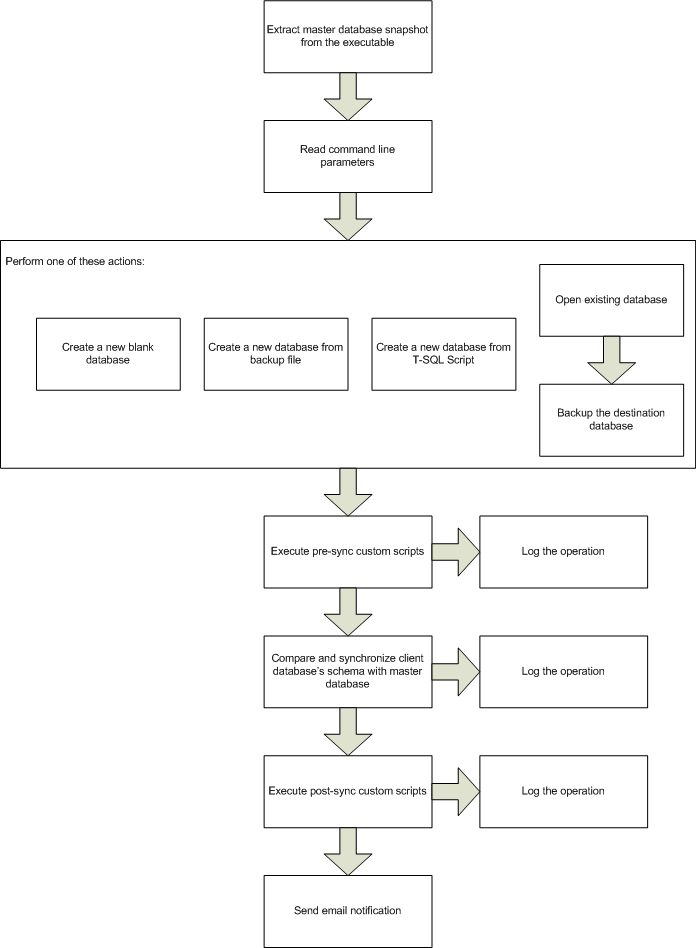
The main idea behind xSQL Builder is the automation of the deployment of database changes to multiple clients. How does the Builder it accomplish that goal? In one sentence: it generates a self-contained executable that propagates the schema of a master database to the clients on which it's executed. As the above sentence implies, there are two big parts to this:

1. Generating the self-contained executable package. The following diagram illustrates the actions that the Builder performs when generating the ready-to-deploy executable package. All the actions shown on the diagram are performed as the user goes step by step through the wizard. Most actions are self-explanatory but the "update .NET template project" may not be obvious. Together with the executable package, the Builder also generates a .NET project that contains the source code that will run on the client machine. The purpose of the project is to allow you to modify the code if necessary and then generate the executable - this allows you to customize the deployment package beyond the standard customization provided by the wizard. 


2. Executing the package. The following diagram illustrates the actions performed on the client. 


Download xSQL Builder now and see for yourself how it makes deploying database changes to clients easy, safe and efficient. 

What is xSQL's Builder for SQL Server?

The easiest way to explain what xSQL Software's Builder for SQL Server would be to list some of the key challenges that anyone who has ever shipped database driven software to clients is familiar with.

  • Most likely access to the client databases that need to be upgraded is not available - the client has to perform the upgrade on his own;
  • The "master" or "reference" database that you want to push out to the clients may not be reachable from the clients' machines;
  • Your clients don't necessarily upgrade in tandem - some clients may be three versions behind some two versions behind etc. so you cannot push out a standard upgrade script for all;
  • You may have customized your solution for some clients and a standard upgrade path may result in those customizations being wiped out. Therefore, for certain clients you may need to run custom T-SQL scripts before and/or after synchronizing the client's database to the master database;
  • Generating a ready-to-deploy executable package for all your clients, instead of sql scripts that would be alien to many of your clients, is highly desirable;
  • Generate a package for your .NET deployment solution or other setup and deployment utilities so that the database upgrade is presented as an integral part of the software upgrade is also desirable;
  • Every situation is different so you need to be able to customize the deployment package before generating it;
  • Receiving a notifications via email when the database deployment package fails to complete all the tasks would be very helpful to you;
  • Logging all operations that are performed on the client machine during the package deployment is not only the prudent thing to do but it's a necessity.

Builder for SQL Server was designed specifically with those challenges in mind, providing a wizard based interface that allows you to create, fully customizable, self contained, ready-to-deploy executable packages. 


Download the Builder for SQL Server now. 

Monday, February 1, 2021

SQL Server Data Compare - comparing large databases

Comparing the data from two SQL Server databases is kind of like comparing two text files to each other, so it should be easy, right? No, it is not easy. The focus of this article is just one of the challenges - the size of the databases being compared. Here is what a data compare tool, like xSQL Software's Data Compare for SQL Server, should be able to do: 

  • In order to compare the data it first needs to pair the tables and views and determine what comparison key to use for each table/view in order to pair rows from both sides with each other
  • Next, read the data from both sides (imagine millions of rows on each table), compare the data and keep track of the differences
  • Display the data differences in an easy to navigate manner- the user wants to see what's different between Server1.Table1 and Server2.Table2. Again, remember we are talking potentially millions of rows for each table pair so just slapping a data-grid on a window is not going to cut it. 
  • Generate a synchronization script which can get to be very large if there are a lot of differences between the databases. 
  • Execute the synchronization script on the target database. Once again, if the script is very large, executing it on the target is not a trivial matter. 
Except for the pairing of the tables step which is not affected by how much data you have to compare, all the other items in the above list are challenging to handle since your resources are limited. Many data compare tools out there will quickly demonstrate this challenge - as soon as you try to compare two relatively large databases they will crash or just keep "spinning the wheel" forever. We have invested considerable amount of effort into designing and building a data compare tool that efficiently handles any size database, restricted only by the disc space available. Our data compare tool seamlessly serializes data into disc, loading the data into the main memory only if and when necessary, and executing the synchronization script against the target database in manageable chunks the size of which is configurable by the user. 

Furthermore, to ensure an efficient comparison, our Data Compare for SQL Server, allows you to both exclude certain columns from the comparison and use row filters to compare only rows that you want to compare (more on those later) thus significantly reducing the workload. 

Download our Data Compare for SQL Server today. 

Sunday, January 31, 2021

File systems versus database management systems (DBMS)

Every DBMS book and beginner course out there discusses this subject, but we still see a considerable number of visitors ending up on our site when searching for “difference between a flat file and a database”, “difference between an excel spreadsheet and a database” etc., so we decided to provide a brief explanation here.  

First of all it is very important to clearly distinguish between a database and a database management system as they are nowadays often used interchangeably (albeit inaccurately). A database in the general sense is any structured collection of data – you have a file where you keep business cards you have collected, that is a database of contacts; you have an excel sheet where you record your ebay sales, that is a database of sales; you have a text file where you have stored a list of prospects, that is database. In a more narrow sense that the term database has evolved into, it really means a structured collection of data that has been stored in a computer system in a particular format through one of the database management systems like Oracle, DB2, SQL Server, MySQL, Access etc. A database management system is a software application that facilitates the process of creating and managing electronic databases. So remember, SQL Server, SQL Azure, Oracle, DB2 etc. are not databases but rather database management systems (dbms). 

So, what do we need a database management system for? Isn’t what the file system that the Operating System provides sufficient for our data storage and administration needs? Consider the following oversimplified requirements – your team has been tasked with building a computer system that will collect and administer data on the employees of the company, products and services the company sells, vendors that supply the company with products and services, customers, orders and so on. You quickly identify the following high level requirements:

  • the amount of the data that needs to be stored will reach in the hundreds of gigabytes;
  • thousands of employees will need to access the information concurrently;
  • the system must answer any queries submitted by the users quickly and accurately;
  • data changes made by different users must be applied consistently;
  • access to the data (ability to read, update or add) must be selective – certain users have certain rights on certain parts of the data. 

If as a programmer / software engineer all you have at your disposal is the operating system and a programming language you soon start to realize the immensity of the challenge you have in front of you:

  • with hundreds of gigabytes of data that will be stored on let’s say an array of hard drives you need to build a system that manages the transfer of data from those hard drives to main memory and vice versa as needed. You realize that how you organize the data into files is going to make or break the system. 
  • thousands of users sending thousands of queries to your system means you need to foresee as best as possible the types of queries the system will receive and write code that will handle each of those queries;
  • What if there is a crash in the middle of the day when hundreds of users were adding and updating data? What happens to your data? When a user enters a sales order for example your application stores the order information and amongst the other things sends an order to the shipping department and updates inventory levels but the system crashed and your code did not complete executing! The inventory numbers were not updated… Your system must be able to handle such situations and ensures that your data does not turn into “garbage” no matter what happens – easy to say but very hard to do.  
  • What happens if two or more users are trying to update the same data at the same time? Your application needs to handle this and other concurrency related issues and this on itself is no small task.
  • How about the selective access to the data? Simply not giving the user a way through the interface to access certain data does not provide sufficient security. Separating the data into files based on security needs and using the operating system security mechanisms sounds good but you will soon discover that such separation is not realistic as it would make every other task your system needs to handle much more difficult. 

Can your team handle all those challenges? Of course it can but at what cost? How long will it take your team to build a stable system that can handle those challenging requirements? 

That is where a database management system (DBMS) comes into play. Companies like Oracle, IBM, Microsoft and others have made billions upon billions of dollars selling their DBMS systems (respectively Oracle, DB2, SQL Server) that at the core are software applications designed to handle all those challenges mentioned above and a lot more.  

A DBMS provides an awesome abstraction layer that saves you a tremendous amount of trouble and effort.

Synchronize database schemas - SQL Compare SDK

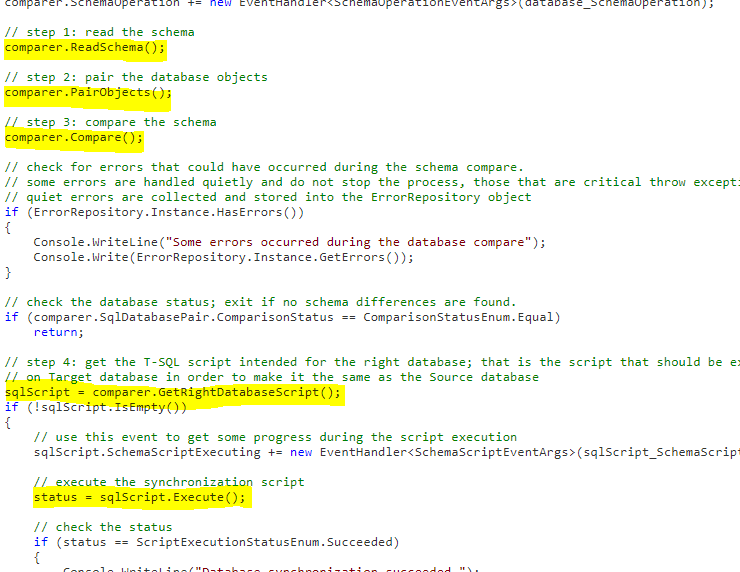
Comparing and synchronizing the schemas of two SQL Server databases is very easy with xSQL Software's SQL Schema Compare SDK. As you can see in the code snippet in the image below, there are only 5 simple steps involved in making the schema of database A the same as the schema of database B: 

  1. Read the schemas of both databases
  2. Pair objects based on the object name
  3. Compare the paired objects to each other
  4. Generate the synchronization script
  5. Execute the script on the target
Of course, as we have mentioned in other articles, SQL Compare SDK gives you complete control over the database compare operation allowing you to:
  1. exclude or include certain types of objects - for example, if you do not want to compare database users you can do comparer.Options.CompareUsers = false
  2. create entity filters to exclude for example only stored procedures the name of which starts with sp_PS
  3. exclude / include specific objects, for example don't compare table "employees"
  4. set comparison options and scripting options based on your specific requirements 
  5. set execution options such as transaction size, whether to continue execution on error etc. 

Download the SQL Schema Compare SDK and check out the extensive documentation - you will be able to build your first database comparison and synchronization application in no time. 

Saturday, January 30, 2021

Database Documenter - what is it good for?

When they hear the words database documentation or Database Documenter many software developers and database administrators think "boring", "annoying", "useless", and "outdated before generated". 

What if you could get a tool that makes documenting the database and keeping the documentation up to date, quick and easy, allowing you to completely automate the process? What if the documentation that that tool generates is so useful that you would keep it pinned on your desktop and use it as a reference every time you need to do something with the database? 

Yes, xSQL Software's Database Documenter is exactly that tool which allows you to do all the above with ease, generating extremely useful HTML and/or CHM documentation that makes it very easy and convenient to understand the database structure, to see the object dependency graphs, to quickly find exactly what you may be looking for. Here's a screen shot showing the Employees table: 


Our Database Documenter supports SQL Server, SQL Azure, Oracle, DB2, MySQL, Sybase ASE, Informix IDS, SQLite, Teradata, VistaDB, ENEA Polyhedra, Raima RDM. Download and try the Documenter today.